File Upload Guide

File Upload Guide
We want to make it easy and effortless to upload and onboard your content. Any recent content that provides context about your firm is helpful.
Note: Before you upload a file, ensure that the file name is in your preferred format. We cannot edit file names after they've been uploaded.
Certain file types work better than others (for now). Our preferred format is Microsoft Word (.docx and .doc). Adobe PDF and Microsoft Excel (.xlsx and .xls) files are also acceptable.
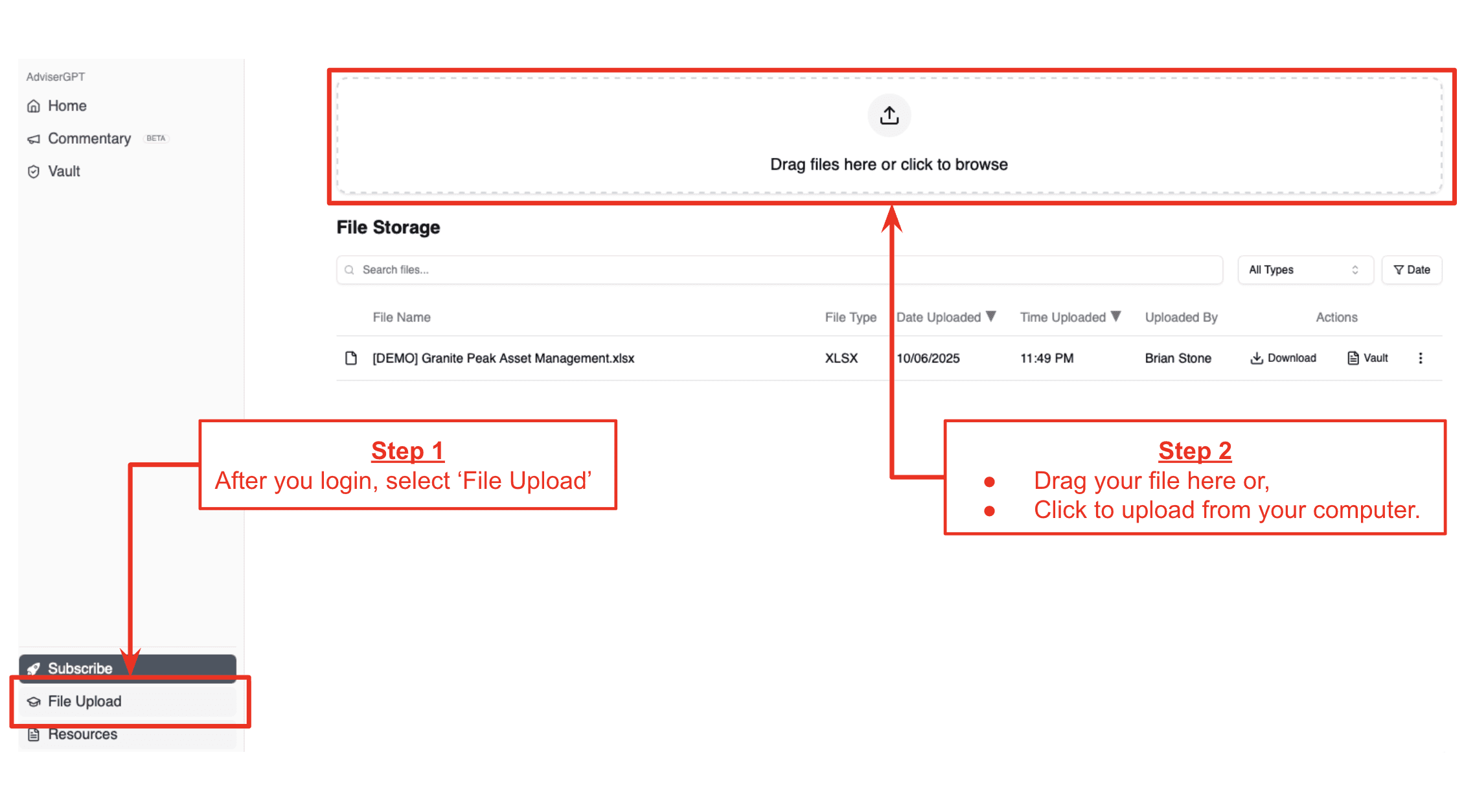
Uploading a file is simple. After you login to the AdviserGPT Web App, select the 'File Upload' button in the bottom left corner. Then, drag your file into the box in the upper half of the screen, or click the box to upload from your computer.
Any recently completed RFPs, DDQs, or your question-and-answer templates are good candidates for upload and onboarding to your Vault. We recommend limiting Policy documents, Commentary or Market Insights documents, and Data Files (xls) to one or two of your most recent firm examples to start so that you (and we) can see how they influence the quality and tone of your 'semantic match' answers and 'AI-generated' content.